Due to the ever-evolving nature of knowledge and skills required in the workplace, emphasis has been given to formulating new models of flexible and self-regulated professional development to meet the needs of today’s professionals (Dolasinski & Reynolds, 2020; Zhang & West, 2020). In this regard, the usefulness of microlearning, which refers to short learning units in various formats (Major & Calandrino, 2018), has been recognized by industry managers for professional development of their employees (Hanshaw & Hanson, 2018; Jahnke et al., 2020). Microlearning can be utilized beyond industry contexts as well. Hug (2010) positioned microlearning as “a useful relational crossover concept” (para. 6). According to Hug (2010), microlearning is not limited to one approach, but it is a perspective that can be applied in multiple contexts.
The empirical research on the design, development, and implementation of microlearning is limited (Dolasinski & Reynolds, 2020; Zhang & West, 2020). Although only a few models (e.g., Alqurashi, 2017; Dolasinski & Reynolds, 2020) and frameworks (Hug, 2007) and theories (Bal et al., 2023), exist in the literature; they primarily focus on the big picture without providing details for the design and development considerations of specific microlearning resources. Thus, it is challenging for novice and expert designers alike to create microlearning resources without guidance on the microlearning design and development process. The purpose of this study is to bridge the gap by presenting a microlearning video checklist and describing the process of creating the checklist following Design-based Research (DBR). This paper will dive into microlearning, including the existing theories and frameworks, and into novice and expert design to introduce a microlearning checklist that can be utilized by novice and expert designers alike.
Microlearning refers to bite-size chunks of information for learning purposes that are designed and developed in a variety of formats (Major & Calandrino, 2018). The examples of microlearning include “short” videos, infographics, memes, or images. The specificity of shortness depends upon the nature of products and learning objectives (Tipton, 2018; 2020). Microlearning differs from chunking material as microlearning has a beginning, middle, and end where the learner can perform the skill or concept at the end of the learning resource (Tipton, 2020).
Microlearning design research has focused on the types of resources or on activities (Alqurashi, 2017; Dolasinski & Reynolds, 2020; Javorcik & Polasek, 2019; Major & Calandrino, 2018; Zhang & West, 2020), presenting a big picture view of insights into selecting and chunking content. Alqurashi’s (2017) microlearning model focuses on the content, pedagogy, and technology aspects of designing microlearning, supporting the designer in drilling down to the necessary content, choosing the appropriate pedagogical and theoretical design principles in the design of that content, and how the choice in the technological platform further impacts content design. Dolasinski and Reynolds’ (2020) microlearning model more closely follows ADDIE (Analyze, Design, Develop, Implement, Evaluate) by continuing the design process to learner use (implementation) and evaluation of skill and knowledge acquisition. Dolasinski and Reynolds’ model focuses on the selection of content utilizing various types of media. Content selection is based on the delivery method, and the length of the microlearning session. Hug’s (2006) framework also includes the length, selection of content, media type, and expands to learning type, exploring behaviorist, pragmatist, and action learning. Tufan (2021) connected microlearning to Mayer’s (2017) and Mayer’s et al. (2020) design principles for effective instructional videos, providing useful design tips for microlearning and considerations for microlearning videos.
However, there is still a gap in our understanding on what to consider while designing and developing specific microlearning resources. The authors argue, for practitioners and other instructional stakeholders, these big picture ideals are not specific enough to create quality microlearning resources.
Defining or measuring instructional design (ID) skills is complex as they are often implicit and depend on a particular context where the skills are applied (Ertmer & Stepich, 2005; Winn, 1990). Although expert designers utilize general guidelines from ID models, they mostly focus on prior experience in solving design problems (Lawson, 2004, 2019). Whereas novice designers are short of experience and need ancillary support to guide them throughout the design and development process (Ertmer et al., 2009). Novice designers benefit from using checklists as the checklists guide them through each step of the design and development process, while being adaptable to support more seasoned designers (Altavilla et al., 2021; Becattini & Cascini, 2014). Altavilla et al. (2021) further found that designers who utilized checklists with too many details/examples performed worse than novice designers who used more general checklists. The balance of enough details to guide novice designers without impeding performance became the focus, specifically on informal microlearning design.
Few empirically created microlearning checklists exist (Bal, 2024), but microlearning checklists can be found in online writings such as blogs and websites. The microlearning checklists in these resources are primarily focused around asking reflective questions after the design work is already completed to determine if the product is microlearning (AllenComm, n.d.; Chakraborty, 2021; Commlab India, 2023; Peterson, 2023). Brew (n.d.) and SPEACH (n.d.) created checklists that can be used throughout the design process, with Brew giving designers a list of considerations to utilize while creating the product and SPEACH outlining a prescriptive process for designing and building a microlearning product. Disha’s (2021) checklist stands out as it includes evaluation on the success of the microlearning product after implementation. Although these checklists can be helpful, they were not developed based on empirical data and no one checklist includes the breadth needed for the design, development, and implementation of microlearning.
To bridge the need for more specific microlearning design considerations and to support novice, and experienced designers, an empirically-based checklist was developed for informal microlearning videos using DBR. The Theory of Learning in Micro (Bal et al., 2023) was used as the theoretical framework for the development of the checklist for microlearning video design. Founded on beliefs of knowledge and design, this theory emphasizes that learning is a continual process best supported by concise focused resources and activities. This Microlearning Video Design Checklist (MVDC) was created after exploring practical applications of established theories: Cognitive Theory for Multimedia Learning (CTML; Mayer, 2017; Mayer et al., 2020), Self-Regulated Learning (SRL; Zimmerman, 2002), and Cognitive Load Theory (CLT; Paas et al., 2010), and microlearning concepts (Hug, 2006, 2007, 2010). In future iterations of the checklist, other guidelines and standards were added: the Web Content Accessibility Guidelines (WCAG) 2.1 (W3C WAI, 2019), Revised Section 508 Standards and 255 Guidelines (U.S. Access Board, 2018), the Framework for Analyzing any U.S. Copyright Problem (Smith & Macklin, 2014), and guidelines for diversity, equity, and inclusion (DEI; Jackson, n.d.), into practical statements to support designers in developing microlearning videos.
Focusing on the theories that started version one (V1) of the checklist, the inclusion of SRL focused on the learners’ self-awareness of their learning goals and reflective practices in learning and was selected to incorporate goal setting, self-observation, and self-reflection components into the learning environment (Zimmerman, 2002). The CTML inclusion focused on design aspects of multimedia products, how those design aspects can support learning, and was chosen for the design components of our microlearning resources (Mayer, 2017; Mayer et al., 2020). The CLT inclusion focused on the amount of information someone can learn and the process of moving new learning into long-term memory. CLT was chosen to ensure learners are not overwhelmed with the new information presented within the microlearning resource and are supported as they construct their own knowledge and connect new information to prior knowledge to support long-term memory (Paas et al., 2010). See Table 1 for a concise description.
Table 1
Rationale behind SRL, CTML, and CLT’s Inclusion in the V1 of the Checklist
Theory | Why Included? |
SRL | To incorporate learners’ goal setting, self-observation, and self-reflection components into the learning environment. |
CTML | To guide the design components of microlearning resources. |
CLT | To ensure learners are not overwhelmed with the new information presented within the microlearning resource and are supported as they construct their own knowledge and connect new information to prior knowledge to support long-term memory. |
The researchers utilized these three theories along with microlearning concepts presented by Hug (2006, 2007, 2010) to develop V1 of the checklist: 18 unique statements for microlearning design (Table 2). This checklist was utilized to answer the overarching research question: How does novice feedback support the improvement of an MVDC? with three sub-questions used over three groups and three versions of the MVDC:
(RQ1) What were the perceptions of the participants when using the checklist for analyzing and designing video microlearning products?
(RQ2) What changes were suggested by the participants for their version of the checklist?
(RQ3) What updates were made to the checklist based on the suggested changes of the participants?
Table 2
Version 1 of the MVDC
MVDC V1 Checklist Statements |
|
Note. In V1 of the MVDC, no periods were included at the end of the statements.
DBR is a continual process of designing, implementing, and evaluating over multiple iterations with the goal to make improvements on a design (Hoadley & Campos, 2022; McKenney & Reeves, 2018; Wang & Hannafin, 2005). This study utilized three iterations of DBR with three different groups of participants starting with MVDC V1. Between the groups, the MVDC was updated with Group 1 participants using MVDC V1, Group 2 participants using version two (V2), and Group 3 participants using version three (V3). This study employed a multi-method approach utilizing (a) qualitative methods for each DBR group (n = 3) and (b) convergent mixed methods for the overarching research question (see Figures 1 and 2).
Figure 1
Qualitative methods for each DBR group
Figure 1
Qualitative methods for each DBR group
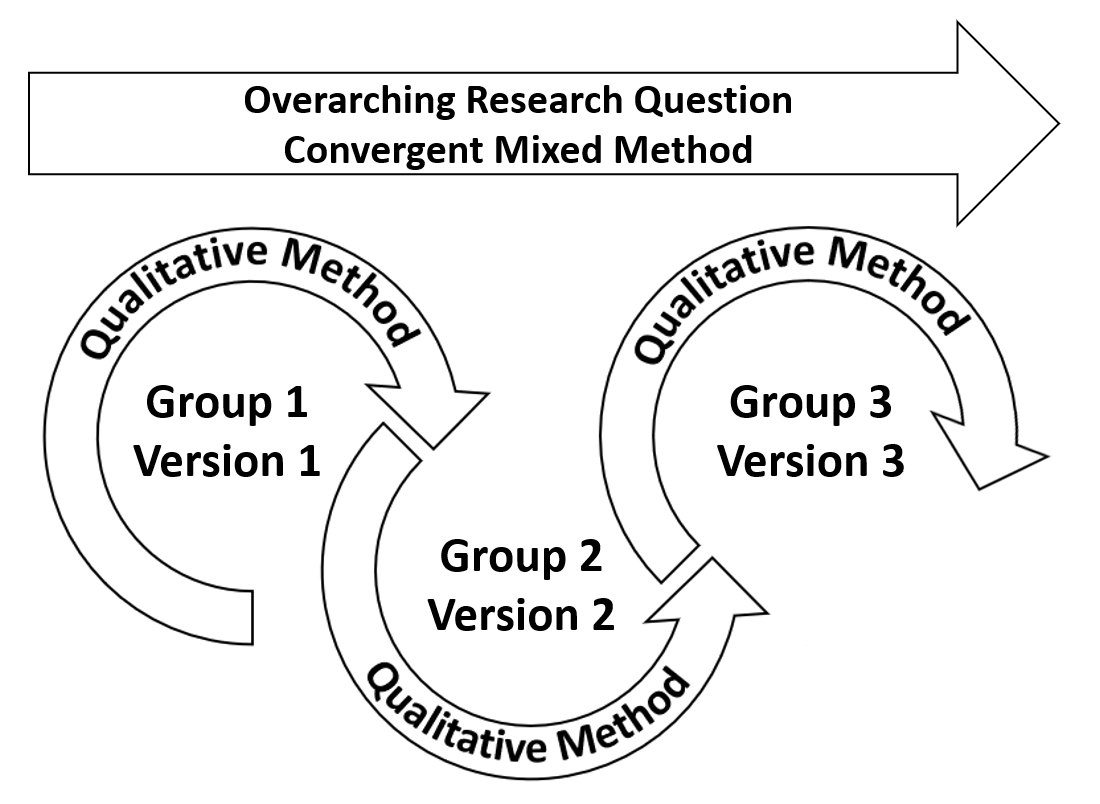
Figure 2
Convergent mixed methods for the overarching research question

Three groups of participants were included in this study. Participants (N = 51) were recruited with a purposive, convenience sample (Andrade, 2021) from an 8-week, graduate education multimedia design courses during the Spring 2021 and Spring 2022 semesters. All participants were PK-12th grade teachers. Group 1 participants (n = 11) were enrolled from January to March 2021. Group 2 participants (n = 16) were enrolled from March to May 2021, and group 3 participants (n = 24) were enrolled from March to May 2022.
The sample size aligns with methodological recommendations for convergent mixed-methods research, where study complexity determines the approach and qualitative insights complement statistical findings (Creswell & Plano Clark, 2018; Guest, 2013). According to Cohen's (1988) power analysis , sample sizes of 11-24 per group are generally adequate for detecting medium effect sizes in ANOVA, providing sufficient statistical power while supporting in-depth qualitative exploration and enhancing the study's understanding of the overarching research question.
The 8-week, graduate education multimedia design courses focused on multimedia design with an emphasis on microlearning products, were taught by the same instructor, who is also the lead author. The courses included content on microlearning, cognitive load theory (CLT), cognitive theory for multimedia learning (CTML), self-regulated learning (SRL), U.S. copyright, and accessibility. The courses were identical in content and facilitation except that Group 1 did not have explicit content on SRL as it was still being developed. Participants created multiple products in the course, utilizing their version of the MVDC.
This multi-method study included both qualitative methods and convergent mixed methods. Data was collected between January 2021 to May 2022. Group 1 data was collected from January to March 2021 with MVDC V1. Group 2 data was collected from March to May 2021 with MVDC V2. Group 3 data was collected from March to May 2022 with MVDC V3. Within each group (n = 3), qualitative methods were used to update the MVDC from V1 to Version 4 (V4) and answer the three sub-research questions. Surveys were used with similar Likert-scale questions (descriptive data) and open-response questions focusing on the use of the checklist and suggested updates to the checklist.
For the overarching research question, a convergent mixed method was utilized with both quantitative and qualitative data. The quantitative data included six-point Likert-scale questions for each group, focusing on the participants’ perceptions of the checklist in both analyzing a microlearning product and designing a microlearning video. The qualitative data included the themes from each group based on the open-responses from the surveys. The authors reviewed the similarities and differences between each group, and the updates made to the checklists across each group.
Likert-scale questions were analyzed with descriptive statistics for each group, and the open-response questions were analyzed per group by the same three researchers utilizing a two-cycle coding method with In-vivo coding used first and Holistic coding used second (Saldaña, 2021). To support intercoder agreement, the researchers analyzed the qualitative data separately, meeting to compare and finalize codes and themes, and created a codebook that was utilized during the analysis of each group. Notes were also taken during the coder meetings to ensure accurate descriptions of the changes, and any researcher bias was identified and clarified. The checklists were updated between groups based on the qualitative data and the updated checklists were utilized with the next group of participants.
For the convergent mixed method, the quantitative data was analyzed with descriptive statistics per group and ANOVA between the three groups for any differences in perceptions by group. The themes from the qualitative data, previously analyzed for each group, were compared for similarities and differences. The updates to the checklists were also compared across V1 to V4.
The results are presented by group, then by research question (RQ1, RQ2, RQ3).
Overall, the participants (N = 51) were primarily female (74.51%) between the ages of 25-39 (54.90%), not Hispanic (94.12%) and White or Caucasian (49.02%). Participants were asked about their video development knowledge with rating selection of beginner, competent, and expert, and previous experience in designing videos with rating selection of very little, some, and quite a bit. Over half the participants identified as a beginner (58.82%) in their video development knowledge and reported some (50.98%) previous experience in designing videos (see Appendix A, Table A1 for the participant demographics for each group).
For RQ1, What were the perceptions of the participants when using the checklist for analyzing and designing video microlearning products?, the Group 1 participants found the checklist easy to use in the analysis and design of a microlearning video. This ease of use, illustrated in Table 3 Statement 1, was further supported with participants disagreeing with the statement suggesting the checklist was not clear (Table 3, Statement 3). Overall, participants disagreed with Statement 5, I would not use this checklist to create future microlearning videos, indicating they would continue to use the checklist in future microlearning video designs (Table 3).
Table 3
Group 1 Perceptions of MVDC V1
Likert Question | M | SD |
| 5.36 | 0.92 |
| 4.80 | 0.92 |
| 2.90 | 0.57 |
| 4.20 | 0.92 |
| 2.80 | 1.40 |
| 3.60 | 1.90 |
Note. The order of Likert questions in this table differs from how they were presented to participants. The order has been rearranged to group similar items. Likert = six-point scale
For RQ2, What changes were suggested by the participants for their version of the checklist?, two main updates were suggested by the Group 1 participants: (a) pull apart double-barreled statements and (b) separate the CTML principles (shown with corresponding participant quotes in Table 4).
Pulling apart the double-barreled statements was suggested as sometimes part of the statement was included in the participants’ design, but the other part was not included as exemplified by Participant 7 (Table 4). Although Participant 7 was indicating more choice within the utilized survey, the idea of a “partial option” led to a review of the double-barreled statements and a discussion amongst the researchers on if they should be separated.
The separation of the CTML principles was suggested as participants indicated that some of the CTML statements were included, and others were not. With only one checklist item encompassing multiple CTML aspects (see bullet 15 in Table 2), it was difficult for participants to say if CTML principles were included or not included. Participant 7 indicated the need for separation while Participants 9 and 5 were less explicit in the need of separating the CTML principles but supported this need through their want of certain CTML items included in the checklist (Table 4).
Table 4
Revision Items and Corresponding Quotes from Group 1 Participants
Revision | Participant Quotes |
Pulled apart double- barrelled statements | “When identifying which components are evident/not evident, it would be nice to have a ‘somewhat evident’ or ‘partial’ option” (Participant 7). |
Separated CTML principles | “Some slides were narrated verbatim, while others clearly implemented the coherence and redundancy principles” (Participant 7). |
“Speaker's speed and tone of voice are two factors I'd like to see added to the checklist as it would address the voice principle” (Participant 9). | |
“I would add an element [to the checklist] about voice/tone or music” (Participant 5). |
Overall, for Group 1 RQ3, What updates were made to the checklist based on the suggested changes of the participants?, four updates were made from MVDC V1 to MVDC V2 with four statements not changed:
seven statements were updated due to double-barreled items;
one statement was separated for CTML;
five statements were updated to reduce wordiness and for more novice-friendly language; and
one statement was updated to a full sentence.
Seven double-barreled statements in MVDC V1 were updated (see Table 5 for examples, and Appendix A, Table A2 for all double-barreled changes from V1 to V2). The updates in these seven statements included:
Two statements were separated into four distinct statements.
Two statements, which originally included the words visuals and graphs, and graphics and videos, were updated with visual media as that encompasses both visuals and graphs.
One statement was separated into two statements with extraneous words removed. After separating the statements, the researchers agreed the statements were very similar, so they combined the separated statements into one non-double-barreled statement.
Two statements included the words skill and knowledge which were updated to skills, as microlearning should be supporting the acquisition and application of knowledge (Emerson & Berge, 2018; Manning et al., 2021; Polasek & Javorcik, 2019).
Table 5
MVDC V1 to V2 update examples for double-barreled statements
Updates | V1 | V2 |
Separated into two statements | Video description and title provide intrinsic interest and value to learners | Video description is intrinsically interesting to viewers. |
Video title is intrinsically interesting to viewers. | ||
Replaced words | Video uses visuals and graphs with the expert’s voice | Video uses visual media with the expert’s voice. |
Separated double-barreled items and reduced | Video includes resources for further knowledge and skill development for the learner | The video includes resources to further develop the skills about the topic. |
When separating the one CTML statement in MVDC V1, the researchers reviewed the CTML principles from Mayer (2017) and listed them separately for the checklist (see Table 6 for examples and Appendix A, Table A3 for the full list). Each statement was aligned to a CTML principle (Mayer, 2017) but written to support novice designers who may not know Mayer’s principles. A few of the CTML principles were not included as they were similar to other statements already included in the checklist (e.g., Segmenting and Pre-Training).
Table 6
MVDC V1 to V2 update examples for CTML statements
V1 | V2 |
Video utilizes Cognitive Theory for Multimedia Learning principles to reduce the extraneous processing | The utilized media supports the content. |
Limited on-screen text is utilized. |
A few other updates to the MVDC V1 were completed. These updates included:
updating five statements to reduce wordiness and support more novice-friendly language;
updating one statement for more novice-friendly language and changing the word information to content; and
adding periods to the end of each statement (see Table 7 for examples and Appendix A, Table A4 for the full list).
These updates moved the MVDC V1 from 18 statements to 27 statements in the MVDC V2 (Table 8).
Table 7
Examples of other updates to the MVDC V1 to V2
Updates | V1 | V2 |
Reduced wordiness and novice-friendly language | Video provides space for learners to identify if they need to view more information for deeper understanding | The video provides the opportunity to identify more information about the topic presented. |
Novice-friendly language | Amount of information is limited to support processing capacity | The amount of content is limited to support understanding. |
Table 8
Version 2 of the MVDC
MVDC V2 Statements |
|
For RQ1, What were the perceptions of the participants when using the checklist for analyzing and designing video microlearning products?, the Group 2 participants found the V2 checklist easy to use in the analysis and design of a microlearning video (Table 9, Statements 1 and 2). This ease of use was further supported with participants disagreeing with the statement on the lack of clarity of the checklist (Table 9, Statement 3). Overall, participants disagreed with Statement 5, I would not use this checklist to create future microlearning videos, indicating they would continue to use the checklist in future microlearning video designs (Table 9).
Table 9
Group 2 Perceptions of MVDC V2
Likert Statements | M | SD |
| 5.50 | 0.82 |
| 4.81 | 0.98 |
| 2.44 | 1.15 |
| 4.81 | 0.54 |
| 2.06 | 1.00 |
| 4.31 | 1.66 |
Note. The order of Likert questions in this table differs from how they were presented to participants. The order has been rearranged to group like items.
For RQ2, What changes were suggested by the participants for their version of the checklist?, six updates to V2 were suggested by the Group 2 participants:
Statement terminology was clarified.
The use of if/then statements.
Updates to the word expert.
Chunking the checklist to make it shorter.
Include DEI statements.
Question: Does the checklist apply to learners of all ages?
The first four of the six updates were completed for V3, shown with corresponding participant quotes in Table 10. The remaining two items suggested by the participants, but not included due to time constraints, are presented in Table 11.
For the use of if/then statements, some participants questioned if all the checklist items were needed. They also stated they did not see some of the checklist items in the provided example they analyzed. Due to this, some statements were shifted to if/then, creating them as optional statements. The term expert was also updated, and some of the statements in V2 that included the term expert were rewritten as if/then statements.
To chunk the statements (fourth update), the researchers began with organizing the checklist statements in order by beginning, middle, and end for multimedia design. This proved quite difficult, so the researchers then began organizing the statements into content and design categories. This also did not work as many statements overlapped in content and design. Finally, the researchers utilized the Double ED Model (Bal & Duha, 2022) as a framework for the statements and were able to easily place the statements into each phase, establish, examine, design, and deliver, chunking the statements into four distinct phases of microlearning design.
Table 10
G2 RQ2 Revisions and Corresponding Participant Quotes
Revision | Participant Quotes |
Clarification of statement terminology (e.g., intrinsically interesting) | “What I found interesting might not be what someone else thinks is important. What makes something interesting?” (Participant 15). “I feel the checklist needs to be a little bit more clear of what I exactly need to be looking for” (Participant 23). |
Added if/then statements (Participants’ feedback led to revising some checklist items into optional if/then statements) | “...the video did provide avatars/characters in some parts, but they did not have any live human-like movements” (Participant 20). |
Updated the term “expert” and some of the statements in V2 that included the term expert were rewritten as if/then statements. | “Do we know the person narrating is an expert?” (Participant 12). “I think there needs to be an explanation of what is an expert” (Participant 15). |
Chunked the statements in the checklist into four distinct phases of microlearning design to make it shorter by following the Double Ed Model (Bal & Duha, 2022). | “It [the checklist] was way too long” (Participant 25). “Limit the amount of questions [statements]. Make the checklist short and sweet” (Participant 27). |
Due to time limitations, the last two updates were not completed for V3. Although the inclusion of DEI statements was not completed for V3, it was revisited and statements for DEI were created for V4. The researchers discussed the use of the MVDC for various learner ages but determined this should be something tested in the future instead of updated in the checklist.
Table 11
G2 RQ2 Suggested Revisions and Corresponding Participant Quotes Not Completed
Suggested Revisions | Participant Quotes |
Including DEI statements to the checklist | “Is the video inclusive? Is the video open to diversity?” (Participant 21). |
Considering if the checklist applies to learners of all ages. | “I am worried that not all parts of the checklist will/should apply to everyone’s multimedia video. For example, I am having a hard time thinking of how to have third-graders assess themselves to determine what they still need to know” (Participant 19). |
Overall, for Group 2 RQ3 - What updates were made to the checklist based on the suggested changes of the participants?, six updates were made from MVDC V2 to MVDC V3, with 10 statements not changed:
three statements were changed for clarity;
four statements from V2 were updated to if/then statements which resulted in three V3 if/then statements;
five expert statements from V2 were updated in terminology or removed which resulted in three V3 expert statements;
15 statements were added for copyright and accessibility;
nine V2 statements were updated for other updates such as anthropomorphism, redundancy, and consistency which resulted in seven V3 statements; and
the checklist was chunked into four phases based on the Double ED Model (Bal & Duha, 2022).
The three statements updated for clarity from V2 to V3 were changed by removing ambiguous words such as intrinsically interesting and clarifying the reflection questions (see Table 12 for examples and Appendix A, Table A5 for all clarity updates from V2 to V3).
Table 12
MVDC V2 to V3 update examples for clarity of statements
Updates | V2 | V3 |
Removed ambiguous words | Video description is intrinsically interesting to viewers. | Video description summarizes the key content elements of the video. |
For if/then statements, four V2 statements, which focused on experts and movement of characters, were moved to optional checklist items with if/then statements (see Table 13 for examples, and Appendix A, Table A6 for all if/then updates from V2 to V3). Two of the V2 statements were very similar when reviewed together, so the researchers combined them into one V3 statement.
Table 13
MVDC V2 to V3 update examples for if/then statements
Updates | V2 | V3 |
If/then statement | Experts are interviewed conversationally. | If an expert is interviewed, interview them in a conversational manner. |
Combined and if/then | Video uses visual media with the expert’s voice. | If an expert is interviewed, use visual media timed with the expert’s voice. |
Visual media is timed with the expert’s voice. |
For the removal of the term experts, five V2 statements were reviewed resulting in three expert statements in V3. The updates included:
One of the V2 statements was reworded from the word experts to the phrase credible sources, shifting the inclusion of an expert to content from credible sources (Table 14).
One expert statement was removed from V2 to V3 as it was redundant with another expert statement (Table 14).
One V2 statement was reworded to an optional if/then statement (Table 13).
Two V2 statements were combined to one statement and created as an optional if/then statement (Table 13).
Table 14
MVDC V2 to V3 updates for expert removal statements
Updates | V2 | V3 |
Reworded | Video contains information from experts. | Include information from credible sources created or produced by a recognized professional in the subject. |
Removed | Information is presented in the expert’s voice. |
Although copyright and accessibility were not suggested by participants, the researchers believed including statements on accessibility and copyright would support novice designers and should be included in an MVDC. This was also supported by observations from the course instructor. The Framework for Analyzing any U.S. Copyright Problem (Smith & Macklin, 2014) was selected to incorporate statements related to copyright. WCAG 2.1 (W3C WAI, 2019) and the Revised Section 508 Standards and 255 Guidelines (U.S. Access Board, 2018) were chosen to reflect accessibility and usability standards in the checklist.
For copyright, two statements were added based on Smith and Macklin’s (2014) framework for analyzing U.S. copyright to support novice designers in reducing copyright infringement based on United States laws. These two statements were developed to match the other updates in V3.
For accessibility, 13 statements were added based on W3C WAI (2019) WCAG guidelines and the U.S. Access Board (2018) 508 standards. These two resources are United States based but support inclusive practices for learners who need accessible content and for everyone accessing content on the internet. The researchers reviewed the WCAG guidelines and the 508 standards for inclusion in the checklist considering what guidelines and standards support videos resulting in 13 statements (see Table 15 for examples, and Appendix A, Table A7 for all copyright and accessibility updates to V3).
Table 15
MVDC V2 to V3 update examples for copyright and accessibility statements
Source | V3 |
Copyright | If the resources/materials are copyrighted, check the permissions needed or if they are exempt. |
Accessibility | |
WCAG Guideline 1.4 | Text and background colors are contrasting to support legibility. |
Section 508 Standards | A platform that has options for keyboard or an assistive device navigation is used. |
A few other updates to the MVDC V2 were completed (see Table 16 for examples, and Appendix A, Table A8 for all changes of the other updates from V2 to V3). These updates included:
Revising three statements due to redundancy.
Revising two statements for anthropomorphism.
Reducing the wordiness of two statements.
Updating two statements for consistency with the other V3 statements.
Removing statements due to redundancy.
Table 16
MVDC V2 to V3 other statement update examples
Updates | V2 | V3 |
Redundancy | Video is less than 20 minutes in length with the ability to pause. | Video is 20 minutes or less in length. |
Redundancy and anthropomorphism | Video contains key terms about the topic. | Include key terms about the topic. |
Reduced wordiness | Text and spoken material are presented in first and/or second person. | Content is presented in first and/or second person. |
Consistency | Prompts are provided for viewers to set goals prior to the start of the video. | Provide prompts for viewers to set goals prior to the start of the video |
Removed | Information is presented in the expert’s voice. |
Finally, the statements were chunked based on the Double ED Model developed by the Bal and Duha (2022). The Double ED Model includes four phases: establish, examine, design, and deliver. The statements were organized within those four phases and then ranked from first to last within each of the phases based on designing a multimedia product. This resulted in 39 statements, chunked into four phases for MVDC V3 (Table 17).
Table 17
Version 3 of the MVDC
Phase of the Double ED Model | MVDC V3 Statements |
Establish |
|
Examine |
|
Design |
|
Deliver |
|
For RQ1, what were the perceptions of the participants when using the checklist for analyzing and designing video microlearning products?, the Group 3 participants found the V3 checklist easy to use in the analysis and design of a microlearning video (Table 18, Statements 1 and 2). This ease of use was further supported with participants disagreeing with Statement 3, It was not clear how these checklist items should be used in my video. Overall, participants disagreed with Statement 5, I would not use this checklist to create future microlearning videos, indicating they would continue to use the checklist in future microlearning video designs (Table 18).
Table 18
Group 3 Perceptions of MVDC V3
Likert Statements | M | SD |
| 5.50 | 0.59 |
| 4.75 | 0.62 |
| 2.25 | 0.97 |
| 4.67 | 0.49 |
| 2.75 | 1.42 |
| 4.81 | 1.29 |
Note. The order of Likert questions in this table differs from how they were presented to participants. The order has been rearranged to group like items.
For RQ2, what changes were suggested by the participants for their version of the checklist?, six updates to V3 were suggested by the Group 3 participants:
Adding more information on copyright and accessibility.
Adding DEI statements.
Starting all statements with an action verb.
Removing repetitive statements.
Create interactive checklist with check boxes.
Reduce the number of items in the checklist.
Five of the six updates were completed for V4, shown with corresponding participant quotes in Table 19.
Within the course, the participants received explicit information about copyright and accessibility outside of the checklist, but the participants were still unsure and confused by copyright and accessibility, questioning if designers should already know this information prior to using the checklist. As this checklist was developed for novice and non-novice designers, the authors agreed that more support was needed in the checklist on copyright and accessibility for designers without prior knowledge of these topics.
The inclusion of DEI statements was also suggested from a Group 2 participant but was unable to be completed for V3 due to timing. In Group 3, another participant suggested DEI statements, so the authors took time to create and include DEI specific statements for V4.
Table 19
G3 RQ2 Revisions and Corresponding Participant Quotes
Revision | Participant Quotes |
Added more information on copyright and accessibility to the checklist. | “More instruction on how to use the checklist to determine copyrighted material. Is the viewer expected to already have copyright knowledge and be able to detect items that should be cited or meet proper copyright criteria?” (Participant 49). “I am still struggling with the Design criterion ‘Color should not be the only way to convey meaning.’ I understand that this is an accessibility concern but I just do not comprehend” (Participant 31). |
Included DEI statements to the checklist. | “Perhaps use of characters of different backgrounds, ethnicities, and races” (Participant 41). |
Started all statements with an action verb making them consistent. | “The checklist items sometimes start with an action/verb (include, create, provide, etc...) and sometimes start with the subject/noun (content, color, text, etc...). With the theme of each section of the checklist being an action, having consistent action oriented checklist items that start with verbs may support the flow of the resource” (Participant 50). |
Removed repetitive statements and similar items. | “Not having any repetition options. It can lead to confusion” (Participant 37). |
Created an interactive checklist with check boxes for participants. | “tick them [statements] off when viewing” (Participant 28). |
One update suggested by Participant 32 to reduce the number of items in the checklist, as indicated in their comment, “The checklist is a little bulky and at times hard to identify the parts…,” was not completed in this V4 MVDC. The researchers discussed this comment but decided more feedback from participants on the other updates were needed before the removal of statements occurred.
Overall, for Group 3 RQ3 - What updates were made to the checklist based on the suggested changes of the participants?, five updates were made from MVDC V3 to V4 with eight statements not updated:
six statements were updated with more information on copyright and accessibility;
four statements were added for DEI design considerations;
25 statements were updated to begin with an action verb;
two statements were updated for repetition; and
four statements were updated for clarity.
No updates were made to the chunking of the checklist or where items were located within the four phases.
For the six statements that were updated with more information on copyright and accessibility, the researchers reviewed the copyright and accessibility statements in the MVDC V3 and identified statements that may need more information for novice designers (see Table 20 for examples and Appendix A, Table A9 for all copyright and accessibility information changes from V3 to V4). Resources were then curated and reviewed for inclusion in the statements. In the curation of the resources, the authors chose to use content that was open access, public domain, or creative commons. The researchers decided to link and cite the resources within the statements, so the resources open in a new online window or tab, though discussions on creating content that appears when selected or the cursor hovers over the text was discussed.
Table 20
MVDC V3 to V4 copyright and accessibility information examples
V3 | V4 |
Verify if the resources/materials are copyrighted or part of the public domain. | Verify if the resources/materials are copyrighted or part of the public domain (for more information see Copyright and Fair Use Guidelines for Educators by Ferullo, 2018). |
If the resources/materials are copyrighted, check the permissions needed or if they are exempt. | If using copyrighted resources/materials, check the permissions needed (for more information see Finding Owners and Getting Permission by Harper, 2022). |
Four DEI statements were added to the checklist based on Jackson’s (n.d.) DEI framework. Finding an established framework on DEI considerations for multimedia design proved to be difficult for the researchers. The authors reviewed various frameworks, peer-reviewed articles, and blog posts about designing for DEI, finally selecting Jackson’s as the guiding resource. The four added DEI statements were:
Challenge stereotypes and dominant narratives (e.g., gender, race, economic, power, position).
Include representation of the learner population (e.g., gender, race, body size, ability, age).
Include diverse individuals/characters (e.g., body size, race, hair styles, ability, age).
Include diverse voices for the narration.
When adding these DEI statements to V4, the researchers discussed where within the four phases of the Double ED Model they should land. DEI Statement 1 was added to the examine section of the MVDC and DEI Statements 2 - 4 were added to the design section of the MVDC.
Twenty-five statements were updated to begin with action verbs (see Table 21 for examples and Appendix A, Table A10 for all action verb changes from V3 to V4). During the rewrite of these statements, the researchers also reviewed the statements through length and redundancy, ensuring the V4 statements were not wordier and not repetitive due to the revision to an action verb. If/then statements were kept with a starting frame of If…, with the action verbs added after the if/then sequence.
Table 21
MVDC V3 to V4 action verbs update examples
V3 | V4 |
Idioms, content specific words, and jargon are identified and more content/resources are provided for these specific terms. | Identify and provide more information/resources for idioms, content specific words, and jargon. |
If the resources/materials are copyrighted, check the permissions needed or if they are exempt. | If using copyrighted resources/materials, check the permissions needed (for more information see Finding Owners and Getting Permission by Harper, 2022). |
Two statements were updated for repetition to reduce wordiness (Table 22). Within this update, V3 statement, Include questions that support reflection in the application of the learning in professional or personal environments, was further refined from questions that support reflection to reflection opportunities. The researchers discussed the Group 2 comments in the update of this statement from V3 to V4 specifically focusing on the statements from Participant 23,“I feel the checklist needs to be a little bit more clear of what I exactly need to be looking for,” and Participant 24 specifically asked for clarity on the reflection questions. The researchers believed the change from questions that support reflection to reflection opportunities also supports the comment from Participant 19 in Group 2, “I am having a hard time thinking of how to have third-graders assess themselves to determine what they still need to know,” as the term opportunities expands the types of assessments that can be included than just questions.
Table 22
MVDC V3 to V4 repetition updates
V3 | V4 |
Include questions that support reflection in the application of the learning in professional or personal environments. | Include reflection opportunities for the application of learning in professional or personal environments. |
If your video has no audio track (e.g., Powtoons), include an audio description of the visuals of your video. | If the video has no audio track (e.g., Powtoons), include an audio description of the visuals in the video. |
A few other updates to the MVDC V3 were completed (see Table 23 for examples, and Appendix A, Table A11 for all other updates from V3 to V4). These updates included:
Revising two statements for consistency and adding the term platform to two statements for clarity.
For consistency, in MVDC V3, one of the statements included knowledge and/or skills while a similar statement just included the word skills, thus, the second statement was updated to knowledge and/or skills. The researchers discussed if the addition of knowledge and/or skills created a double-barreled statement but determined that the use of and/or allowed flexibility and was not double-barreled.
Table 23
MVDC V3 to V4 other statement update examples
Updates | V3 | V4 |
Consistency | Include questions that support reflection on new knowledge and/or skills. | Include questions that promote reflection on new knowledge and/or skills. |
Added platform | Pause, speed, and fast forward/rewind options are included. | Use a platform that includes pause, speed, and fast forward/rewind options. |
Finally, the checklist, once updated, was formatted to include check boxes so participants could check off the statements as they designed. These updates resulted in 43 statements to support designers in creating microlearning products. Table 24 showcases the final 43 statements with alignment to the theories, principles, frameworks, guidelines, and standards that were used to create the statements. The checklist provided to participants does not include the alignment of theories (see Discussion section).
Table 24
Version 4 of the MVDC
Key.
⊕ Accessibility
⌺ Cognitive Load
⏅ Cognitive Theory for Multimedia Learning
+ Copyright
* Diversity, Equity, and Inclusion
⊚ Microlearning
⍕ Self-regulated Learning
Phase of the Double ED Model
Establish | Examine | Design | Deliver |
|---|---|---|---|
|
|
|
|
A one-way ANOVA was used to compare the participants’ perceptions of different versions of the checklist. Comparisons were made between Group 1, Group 2, and Group 3. The main effect of the group is statistically significant, and the effect size was large for the item Video Design: It was not clear how these checklist items should be used in my video (F(2, 46) = 22.88, p < .001; η2 = 0.50). The item, Video Design: Implementing the components in my video was easy, was statistically significant with a medium effect size (F(2, 46) = 3.17, p = 0.050; η2 = 0.12; see Table 25). There was no significant difference among the groups for the rest of the perception items. Tukey HSD post hoc test results indicated that Group 2 (M = 2.44, SD = 1.15) and Group 3 (M = 2.25, SD = 0.97) found the checklist significantly clearer about how the checklist items should be used in the microlearning video compared to Group 1 (M = 2.90, SD = 0.57). Additionally, post hoc tests revealed that Group 2 (M = 4.81, SD = 0.54) found implementing the checklist statements in their video product easier as compared to Group 1 (M = 4.20, SD = 0.92).
Table 25
ANOVA results for Group 1, Group 2, and Group 3 Likert items
Likert Item | Group 1 | Group 2 | Group 3 | F(2, 46) | η2 | |||
M | SD | M | SD | M | SD | |||
Video Analysis: This Checklist was Easy to Use. | 5.36 | 0.92 | 5.50 | 0.82 | 5.50 | 0.59 | 0.32 | 0.01 |
Video Design: This checklist was easy to use when designing my video. | 4.80 | 0.92 | 4.81 | 0.98 | 4.75 | 0.62 | 1.26 | 0.05 |
Video Design: It was not clear how these checklist items should be used in my video. | 2.90ab | 0.57 | 2.44a | 1.15 | 2.25b | 0.97 | 22.88** | 0.50 |
Video Design: Implementing the [checklist] components in my video was easy. | 4.20a | 0.92 | 4.81a | 0.54 | 4.67 | 0.49 | 3.17* | 0.12 |
Video Design: I would not use this checklist to create future microlearning videos. | 2.80 | 1.40 | 2.06 | 1.00 | 2.75 | 1.42 | 1.85 | 0.07 |
2nd Product: I used the checklist to develop my product (even though it wasn't required). | 3.60 | 1.90 | 4.31 | 1.66 | 4.81 | 1.29 | 2.06 | 0.09 |
**p < 0.001
*p < 0.05
The themes that lead to updates between the three groups were different but fell into three main categories: clarity, adding more information, and layout of the checklist. For clarity, the separation of double-barreled statements from Group 1, the clarification of terminology, addition of if/then statements, and updates to expert statements from Group 2, and the removal of repetitive statements from Group 3 were completed. For adding more information, the separation of the CTML principles from Group 1, and the addition of more information on copyright and addition of DEI statements from Groups 2 and 3 were completed. For checklist layout, the chunking of the checklist from Group 2 and the rewriting of the statements to action verbs and making the checklist interactive from Group 3 were completed.
The updates from V1 to V4 of the checklist resulted in more clarity for each statement, the addition of 25 statements (V1 = 18; V4 = 43) focused on CTML, accessibility, copyright, and DEI design considerations, and a more user-friendly layout of the checklist. These updates supported the ANOVA results, with specific emphasis on the statistically significant findings. For the statement, Video Design: It was not clear how these checklist items should be used in my video, Group 2 and Group 3 found the checklist clearer in how the statements should be used in video design than Group 1. This indicates the updates from Group 1 to Group 2 and Group 3 were clearer for participants. The Group 2 participants also found that implementing the checklist statements in their video design was easier than Group 1. This further supports that separating the double-barreled statements and the CTML principles made the checklist easier to use in video design than previously. Table A12 in Appendix A showcases the V1 to V3 checklist updates before V3 was chunked with the Double ED Model (Bal & Duha, 2022) and Table A13 in Appendix A includes the V3 to V4 checklist updates after chunking the statements.
In this study, an MVDC was developed and utilized with three groups of participants who analyzed and designed informal microlearning videos with the checklist. Feedback and suggested updates on the checklist were collected during this analysis and design. Through this three-iteration DBR study, the checklist was updated from V1 to V4 resulting in 43 statements with more clarity, more information, and a layout to support designing informal microlearning videos.
Seven theories and concepts were utilized in the development and updates to the checklist: microlearning, CTML, SRL, CLT, accessibility, copyright, and DEI, with each statement aligning to these theories and concepts (see Table 24 for alignment). The purpose of this checklist is two-fold. First, to support the reduction of content for microlearning videos, only focusing on what is necessary, supporting microlearning and CLT. Second, to support the creation of informal microlearning videos that utilize researched principles of multimedia design (CTML), include contributions, presence, and perspectives of different groups (DEI), comply to U.S. copyright law, promote learners’ reflections and metacognition (SRL), and can be accessed by and support everyone (accessibility).
This study expands the current research available on microlearning design (see Alqurashi, 2017; Dolasinski & Reynolds, 2020; Javorcik & Polasek, 2019; Major & Calandrino, 2018; Zhang & West, 2020) by moving beyond the big picture ideals of developing microlearning resources such as selecting and chunking information to design considerations when developing an informal microlearning video. Although experience, over models and checklists, is what expert designers use in designing products (Lawson, 2004, 2019). Novice and intermediate designers benefit from the scaffolds provided by checklists and models (Becattini & Cascini, 2014; Ertmer et al., 2009). This research supports the notion of novice designers benefiting from checklists and showcases novice contribution to the development of a checklist for microlearning design.
Overall, the participants, who primarily identified as novices, thought the checklist was easy to use, both in the analysis and design of a microlearning video. Group 2 and Group 3 found the checklist clearer than Group 1, and Group 2 thought implementing the checklist in the design of their video was easier than Group 1 (see Table 25). Although there were no statistically significant differences between Group 2 and Group 3, the differences between Group 1 and Group 2, and Group 1 and Group 3 showcase the updates made to the checklist supported easier design of a microlearning video than in previous versions. Although not statistically significant, all three groups of participants disagreed with the statement, I would not use this checklist to create future microlearning videos, indicating they would use the checklist to create future microlearning products. The participants’ use of the checklist supports Becattini and Cascini (2014) and Altavilla et al. (2021) research that checklists benefit novice designers, but a question remains if novices can distinguish between some of the nuances of design (Tracey & Boling, 2014).
Within this study, suggestions for removing repetitive statements were consistently provided across the three groups. Some of the statements identified as redundant by the participants included differences in design that the researchers believed were distinctly different. This conflict between the participants' identification and suggestion for removal of redundant statements and the researchers’ beliefs that the statements were not redundant showcases the arguments made in the research on the need for experiences over supports and scaffolds for design (Ertmer et al., 2008; Ertmer et al., 2009).
To provide a clear framework for the practical use of the checklist, the authors propose utilizing the Theory of Learning in Micro (Bal et al., 2023) as a guiding framework. The Theory of Learning in Micro offers a foundation for understanding how microlearning can best support learners through smaller, more focused learning resources. By embedding this theory into the design and application of the MVDC, designers can utilize the checklist more effectively in aligning the design of microlearning videos with essential principles, such as the segmentation of content, the promotion of reflection (SRL), and cognitive load management (CLT).
When providing this checklist to users, the authors suggest a vertical version (as opposed to the horizontal presentation in Table 24) without the alignment of theories (key in Table 24). A vertical version allows users to go through each step in a more linear fashion, while also allowing them to move between steps as needed. Although the alignment of theories is important to know, it can create extraneous load on the user by providing more information than is needed in the moment of use. Table 26 showcases the MVDC V4 in a vertical format, with checkboxes, without the alignment of theories. This format of V4 has been used by the instructor with students since creation.
Table 26
MVDC V4 as Presented to Users (Vertical Format, Checkboxes, No Theory Alignment)
Phase of the Double ED Model | MVDC V4 Statements |
Establish |
|
Examine |
|
Design |
|
Deliver |
|
In future research, the authors suggest exploring how the Theory of Learning in Micro (Bal et al., 2023) can be further integrated into the iterative development and practical application of the checklist. Specifically, researchers could examine how the theory's focus on continual learning processes and micro-level engagement supports both novice and experienced designers in creating high-impact microlearning videos.
This study included several limitations. First, the participants only included K-12 teachers. Therefore, data was not collected from professionals in various fields. Second, the checklist updates were made quickly between version 1 and 2 to facilitate the second iteration process. A longer time period may have provided more reflective opportunities for the updates. Finally, more than half of the participants identified themselves as a beginner (58.82%) in their video development knowledge and reported some (50.98%) previous experience in designing videos (see Appendix A, Table A1). Although this study focused on novice users, some concerns could be raised about the accuracy of their feedback on the checklist.
Since the start of this study, the MVDC has gone through four versions expanding from 18 statements to 43 statements. Within these iterations, statements have been removed, clarified, and added to support copyright, accessibility, and DEI design considerations. The MVDC was developed to bridge the gap for novice and expert designers in creating informal microlearning resources and was adapted from V1 to V4 to specifically support informal video microlearning products. The MVDC differs from other microlearning design guides (see Kasenberg, 2016; Tufan, 2021) as it includes start-to-finish considerations, providing a one-stop resource for the design and development of informal microlearning videos.
Due to the evolving nature of design, a checklist of design considerations cannot be stagnant and must continually be refined. This study showcases the DBR updates from V1 to V4 of an MVDC, but more research is needed on how a checklist can support microlearning designers. The participants suggested updates to the MVDC that should continue to be researched such as if the MVDC is appropriate for learners of all grades and age groups (suggested by Group 1 and Group 2), and if the MVDC can be further reduced (suggested by Group 3). Further research should also be conducted on the use and usefulness of the MVDC between novice and expert designers. Continued research on how checklists for other types of products can be developed, refined, and support designers in microlearning is needed as more microlearning products are created for learning.
Table A1
Participant Demographics for Group 1, Group 2, and Group 3
Demographic | Group 1 n = 11 | Group 2 n = 16 | Group 3 n = 24 | Whole Group N = 51 | ||||
n | % | n | % | n | % | n | % | |
Age | ||||||||
18-24 | 3 | 27.27% | 1 | 6.25% | 4 | 16.67% | 8 | 15.69% |
25-39 | 5 | 45.45% | 10 | 62.50% | 13 | 54.17% | 28 | 54.90% |
40-54 | 3 | 27.27% | 5 | 31.25% | 6 | 25.00% | 14 | 27.45% |
55+ | 0 | 0% | 0 | 0.00% | 1 | 4.17% | 1 | 1.96% |
Gender | ||||||||
Female | 10 | 90.91% | 13 | 81.25% | 15 | 62.50% | 38 | 74.51% |
Male | 1 | 9.09% | 3 | 18.75% | 9 | 37.50% | 13 | 25.49% |
Non-binary | 0 | 0.00% | 0 | 0.00% | 0 | 0.00% | 0 | 0.00% |
Prefer not to say | 0 | 0.00% | 0 | 0.00% | 0 | 0.00% | 0 | 0.00% |
Race | ||||||||
White or Caucasian | 3 | 27.27% | 8 | 50.00% | 14a | 58.33% | 25 | 49.02% |
Black or African American | 7 | 63.64% | 6 | 37.50% | 6 | 25.00% | 19 | 37.25% |
American Indian or Alaska Native | 0 | 0.00% | 0 | 0.00% | 0 | 0.00% | 0 | 0.00% |
Asian | 1 | 9.09% | 2 | 12.50% | 2 | 8.33% | 5 | 9.80% |
Native Hawaiian or Pacific Islander | 0 | 0.00% | 0 | 0.00% | 0 | 0.00% | 0 | 0.00% |
Other | 0 | 0.00% | 0 | 0.00% | 3a | 12.50% | 3 | 5.88% |
Ethnicity | ||||||||
Hispanic or Latino | 0 | 0.00% | 0 | 0.00% | 2 | 8.33% | 2 | 3.92% |
Not Hispanic | 10 | 90.91% | 16 | 100.00% | 22 | 91.67% | 48 | 94.12% |
Decline to Identify | 1 | 9.09% | 0 | 0.00% | 0 | 0.00% | 1 | 1.96% |
Video Development Knowledge | ||||||||
Beginner | 8 | 72.73% | 10 | 62.5% | 12 | 50% | 30 | 58.82% |
Competent | 3 | 27.27% | 6 | 37.50% | 12 | 50% | 21 | 41.18% |
Expert | 0 | 0.00% | 0 | 0.00% | 0 | 0.00% | 0 | 0.00% |
Previous Experience in Designing Videos | ||||||||
Very Little | 6 | 54.55% | 6 | 37.50% | 9 | 37.50% | 21 | 41.18% |
Some | 5 | 45.45% | 9 | 56.25% | 12 | 50.00% | 26 | 50.98% |
Quite A Bit | 0 | 0.00% | 1 | 6.25% | 3 | 12.50% | 4 | 7.84% |
aParticipants could choose more than one. One participant in Group 3 selected both White or Caucasian and Other.
Table A2
MVDC V1 to V2 updates for double-barreled statements
Updates | V1 | V2 |
Separated into two statements | Video description and title provide intrinsic interest and value to learners | Video description is intrinsically interesting to viewers. |
Video title is intrinsically interesting to viewers. | ||
Video includes key terms and definitions | Video contains key terms about the topic. | |
Video contains key definitions about the topic. | ||
Replaced words | Video uses visuals and graphs with the expert’s voice | Video uses visual media with the expert’s voice. |
Graphics and visuals are timed with the expert’s voice | Visual media is timed with the expert’s voice. | |
Separated double-barreled items and reduced | Reflection questions and other prompts are used throughout the video for learners to pause and think about the application of their learning, reflect on the content and their goals, and relate the content back to their professional or personal environments | Reflection questions are used throughout the video for application of the learning in professional or personal environments. |
Video includes resources for further knowledge and skill development for the learner | The video includes resources to further develop the skills about the topic. | |
Video includes questions that support the learner in reflecting on their new knowledge and skill | The video includes questions to support reflective practices about the topic. |
Table A3
MVDC V1 to V2 updates for CTML statements
V1 | V2 |
Video utilizes Cognitive Theory for Multimedia Learning principles to reduce the extraneous processing | The utilized media supports the content. |
Relevant details/information in the video are highlighted. | |
Limited on-screen text is utilized. | |
Visual and auditory information are synched. | |
Presented information is mainly verbal/audio, rather than written. | |
Text and spoken material are presented in first and/or second person. | |
Audio/spoken material is in a human voice. | |
Avatars/characters should have human-like movements. |
Table A4
Other updates to the MVDC V1 to V2
Updates | V1 | V2 |
Reduced wordiness and novice-friendly language | Expert information is presented in the expert’s voice | Information is presented in the expert’s voice. |
Video breaks down complex information into smaller parts that build on one another | Content is broken down into smaller parts that build on one another. | |
Video provides space for learners to identify if they need to view more information for deeper understanding | The video provides the opportunity to identify more information about the topic presented. | |
Video includes questions that support the learner in reflecting on what they still need to know | The video includes questions to assess what the viewers still need to know. | |
Video includes prompts for the learners to reflect on their previously set goals | The video provides prompts to stimulate reflection on viewers’ previously set goals. | |
Novice-friendly language | Amount of information is limited to support processing capacity | The amount of content is limited to support understanding. |
Table A5
MVDC V2 to V3 updates for clarity of statements
Updates | V2 | V3 |
Removed ambiguous words | Video description is intrinsically interesting to viewers. | Video description summarizes the key content elements of the video. |
Video title is intrinsically interesting to viewers. | Video title hooks the intended viewers. | |
Reflection questions are used throughout the video for application of the learning in professional or personal environments. | Include questions that support reflection in the application of the learning in professional or personal environments. |
Table A6
MVDC V2 to V3 updates for if/then statements
Updates | V2 | V3 |
If/then statement | Experts are interviewed conversationally. | If an expert is interviewed, interview them in a conversational manner. |
Avatars/characters should have human-like movements. | If avatars/characters are included, they should have human-like movements. | |
Combined and if/then | Video uses visual media with the expert’s voice. | If an expert is interviewed, use visual media timed with the expert’s voice. |
Visual media is timed with the expert’s voice. |
Table A7
MVDC V2 to V3 updates for copyright and accessibility statements
Source | V3 |
Copyright | Verify if the resources/materials are copyrighted or part of the public domain. |
If the resources/materials are copyrighted, check the permissions needed or if they are exempt. | |
Accessibility | |
WCAG Guideline 1.3 | Choose simple layouts to present information. |
Create a hierarchy of heading levels when presenting textual content. | |
WCAG Guideline 1.4 | Text and background colors are contrasting to support legibility. |
Color should not be the only way to convey meaning. | |
Pause, speed, and fast forward/rewind options are included. | |
WCAG Guideline 3.1 | Idioms, content specific words, and jargon are identified and more content/resources are provided for these specific terms. |
Content is written at the reading ability of the targeted audience. | |
Abbreviations to words and acronyms are provided in expanded form. | |
WCAG Guidelines 2.2 & 2.3 | If any flashing, moving, blinking, or auto-play animation (e.g., Gif) are included, they should not repeat more than three times, or they can be paused or stopped. |
WCAG Guideline 2.4 | Any URLs in the video description are written in descriptive text. |
WCAG Guideline 1.2 & Section 508 Standards | A transcript and/or closed captions that can be turned on/off are included. |
Section 508 Standards | A platform that has options for keyboard or an assistive device navigation is used. |
If your video has no audio track (e.g., Powtoons), include an audio description of the visuals of your video. |
Table A8
MVDC V2 to V3 other statement updates
Updates | V2 | V3 |
Redundancy | Video is less than 20 minutes in length with the ability to pause. | Video is 20 minutes or less in length. |
Redundancy and anthropomorphism | Video contains key terms about the topic. | Include key terms about the topic. |
Video contains key definitions about the topic. | Include key definitions about the topic. | |
Reduced wordiness | Text and spoken material are presented in first and/or second person. | Content is presented in first and/or second person. |
The video includes questions to support reflective practices about the topic. | Include questions that support reflection in the application of the learning in professional or personal environments. | |
Consistency | Prompts are provided for viewers to set goals prior to the start of the video. | Provide prompts for viewers to set goals prior to the start of the video |
The amount of content is limited to support understanding. | Limit the amount of content to support understanding. | |
Removed | Information is presented in the expert’s voice. | |
The video provides the opportunity to identify more information about the topic presented. |
Table A9
MVDC V3 to V4 copyright and accessibility information
V3 | V4 |
Verify if the resources/materials are copyrighted or part of the public domain. | Verify if the resources/materials are copyrighted or part of the public domain (for more information see Copyright and Fair Use Guidelines for Educators by Ferullo, 2018). |
If the resources/materials are copyrighted, check the permissions needed or if they are exempt. | If using copyrighted resources/materials, check the permissions needed (for more information see Finding Owners and Getting Permission by Harper, 2022). |
Create a hierarchy of heading levels when presenting textual content. | Create a hierarchy of heading levels when presenting textual content (for more information see Headings by Eggert & Abou-Zahra, 2017). |
Color should not be the only way to convey meaning. | Convey meaning beyond color (for more information see Accessibility 101 by Grimmet & Duha, 2018). |
Any URLs in the video description are written in descriptive text. | Write URLs in the video description in descriptive text (for more information see Accessibility 101 by Grimmet & Duha, 2018). |
A platform that has options for keyboard or an assistive device navigation is used. | Use a platform that has options for keyboard or assistive device navigation (for more information see Tools and Techniques - Interaction navigating and finding by Abou-Zahra, 2017). |
Table A10
MVDC V3 to V4 action verbs updates
V3 | V4 |
Idioms, content specific words, and jargon are identified and more content/resources are provided for these specific terms. | Identify and provide more information/resources for idioms, content specific words, and jargon. |
If the resources/materials are copyrighted, check the permissions needed or if they are exempt. | If using copyrighted resources/materials, check the permissions needed (for more information see Finding Owners and Getting Permission by Harper, 2022). |
Content is broken down into smaller parts that build on one another. | Break down content into smaller parts that build on one another. |
Content is written at the reading ability of the targeted audience. | Write content at the reading ability of the targeted audience. |
Abbreviations to words and acronyms are provided in expanded form. | Provide abbreviations to words and acronyms in expanded form. |
Content is presented in first and/or second person. | Present content in first and/or second person. |
Presented information is mainly verbal/audio, rather than written. | Present information in a verbal/audio format rather than written. |
Limited on-screen text is utilized. | Limit on screen text. |
Text and background colors are contrasting to support legibility. | Contrast text and background colors to support legibility. |
The utilized media supports the content. | Utilize media that supports the content. |
Visual and auditory information are synched. | Sync visual and auditory information. |
Audio/spoken material is in a human voice. | Use a human voice for audio/spoken material. |
Relevant details/information in the video are highlighted. | Highlight relevant details/information in the video. |
Color should not be the only way to convey meaning. | Convey meaning beyond color (for more information see Accessibility 101 by Grimmet & Duha, 2018). |
If avatars/characters are included, they should have human-like movements. | If including avatars/characters, they should have human-like movements. |
If any flashing, moving, blinking, or auto-play animation (e.g., Gif) are included, they should not repeat more than three times, or they can be paused or stopped. | If including any flashing, moving, blinking, or auto-play animation (e.g., Gif), they should not repeat more than three times, or they can be paused or stopped. |
If an expert is interviewed, interview them in a conversational manner. | If interviewing an expert, conduct it in a conversational manner. |
If an expert is interviewed, use visual media timed with the expert’s voice. | If interviewing an expert, time visual media with the expert’s voice. |
Video is 20 minutes or less in length. | Create a video that is 20 minutes or less. |
Video title hooks the intended viewers. | Create a title that hooks the intended viewers. |
Video description summarizes the key content elements of the video. | Summarize the key content of the video in the description. |
Any URLs in the video description are written in descriptive text. | Write URLs in the video description in descriptive text (for more information see Accessibility 101 by Grimmet & Duha, 2018). |
Pause, speed, and fast forward/rewind options are included. | Use a platform that includes pause, speed, and fast forward/rewind options. |
A transcript and/or closed captions that can be turned on/off are included. | Use a platform that includes closed captions that can be turned on/off and/or a transcript. |
A platform that has options for keyboard or an assistive device navigation is used. | Use a platform that has options for keyboard or assistive device navigation (for more information see Tools and Techniques - Interaction navigating and finding by Abou-Zahra, 2017). |
Table A11
MVDC V3 to V4 other statement updates
Updates | V3 | V4 |
Consistency | Include questions that support reflection on new knowledge and/or skills. | Include questions that promote reflection on new knowledge and/or skills. |
Include resources to further develop the skills about the topic. | Include resources to further develop the knowledge and/or skills about the topic. | |
Added platform | Pause, speed, and fast forward/rewind options are included. | Use a platform that includes pause, speed, and fast forward/rewind options. |
A transcript and/or closed captions that can be turned on/off are included. | Use a platform that includes closed captions that can be turned on/off and/or a transcript. |
Table A12
MVDC Version 1 to Version 3 before chunking
Version 1 | Version 2 | Version 3 Before Chunking |
Video is less than 20 minutes in length with ability to pause | Video is less than 20 minutes in length with the ability to pause. | Video is 20 minutes or less in length. |
Video description and title provide intrinsic interest and value to learners | Video description is intrinsically interesting to viewers. | Video description summarizes the key content elements of the video. |
Video title is intrinsically interesting to viewers. | Video title hooks the intended viewers. | |
Video includes key terms and definitions | Video contains key terms about the topic. | Include key terms about the topic. |
Video contains key definitions about the topic. | Include key definitions about the topic. | |
Video includes information from experts | Video contains information from experts. | Includes information from credible sources created or produced by a recognized professional in the subject. |
Expert information is presented in the expert’s voice | Information is presented in the expert’s voice. | Removed |
Experts are interviewed conversationally | Experts are interviewed conversationally. | If an expert is interviewed, interview them in a conversational manner. |
Video uses visuals and graphs with the expert’s voice | Video uses visual media with the expert’s voice. | If an expert is interviewed, use visual media timed with the expert’s voice. |
Graphics and visuals are timed with the expert’s voice | Visual media is timed with the expert’s voice. | |
Prompts are provided for learners to set goals prior to the start of the video | Prompts are provided for viewers to set goals prior to the start of the video. | Provide prompts for viewers to set goals prior to the start of the video. |
Amount of information is limited to support processing capacity | The amount of content is limited to support understanding. | Limit the amount of content to support understanding. |
Video breaks down complex information into smaller parts that build on one another | Content is broken down into smaller parts that build on one another. | Content is broken down into smaller parts that build on one another. |
Reflection questions and other prompts are used throughout the video for learners to pause and think about the application of their learning, reflect on the content and their goals, and relate the content back to their professional or personal environments | Reflection questions are used throughout the video for application of the learning in professional or personal environments | Include questions that support reflection in the application of the learning in professional or personal environments. |
Video provides space for learners to identify if they need to view more information for deeper understanding | The video provides the opportunity to identify more information about the topic presented. | Removed |
Video includes resources for further knowledge and skill development for the learner | The video includes resources to further develop the skills about the topic. | Include resources to further develop the skills about the topic. |
Video utilizes Cognitive Theory for Multimedia Learning principles to reduce the extraneous processing | The utilized media supports the content. | The utilized media supports the content. |
Relevant details/information in the video are highlighted. | Relevant details/information in the video are highlighted. | |
Limited on-screen text is utilized. | Limited on-screen text is utilized. | |
Visual and auditory information are synched | Visual and auditory information are synched. | |
Not in Version 2 | Pause, speed, and fast forward/rewind options are included. | |
Presented information is mainly verbal/audio, rather than written. | Presented information is mainly verbal/audio, rather than written. | |
Text and spoken material are presented in first and/or second person. | Content is presented in first and/or second person. | |
Audio/spoken material is in a human voice. | Audio/spoken material is in a human voice. | |
Avatars/characters should have human-like movements. | If avatars/characters are included, they should have human-like movements. | |
Video includes questions that support the learner in reflecting on their new knowledge and skill | The video includes questions to support reflective practices about the topic. | Include questions that support reflection on new knowledge and/or skills. |
Video includes questions that support the learner in reflecting on what they still need to know | The video includes questions to assess what the viewers still need to know. | Include questions to assess what the viewers still need to know. |
Video includes prompts for the learners to reflect on their previously set goals | The video provides prompts to stimulate reflection on viewers’ previously set goals. | Provide prompts to stimulate reflection on viewers’ previously set goals. |
Table A13
MVDC Version 3 to Version 4 with chunking
Double ED Model | Version 3 | Version 4 |
Establish | Include key terms about the topic. | Include key terms about the topic. |
Include key definitions about the topic. | Include key definitions about the topic. | |
Idioms, content specific words, and jargon are identified and more content/resources are provided for these specific terms. | Identify and provide more information/resources for idioms, content specific words, and jargon. | |
Include information from credible sources created or produced by a recognized professional in the subject. | Include information from credible sources created or produced by a recognized professional in the subject. | |
Verify if the resources/materials are copyrighted or part of the public domain. | Verify if the resources/materials are copyrighted or part of the public domain (for more information see Copyright and Fair Use Guidelines for Educators by Ferullo, 2018). | |
If the resources/materials are copyrighted, check the permissions needed or if they are exempt. | If using copyrighted resources/materials, check the permissions needed (for more information see Finding Owners and Getting Permission by Harper, 2022). | |
Examine | Limit the amount of content to support understanding. | Limit the amount of content to support understanding. |
Content is broken down into smaller parts that build on one another. | Break down content into smaller parts that build on one another. | |
Content is written at the reading ability of the targeted audience. | Write content at the reading ability of the targeted audience. | |
Not in Version 3 | Challenge stereotypes and dominant narratives (e.g., gender, race, economic, power, position). | |
Abbreviations to words and acronyms are provided in expanded form. | Provide abbreviations to words and acronyms in expanded form. | |
Provide prompts for viewers to set goals prior to the start of the video. | Provide prompts for viewers to set goals prior to the start of the video. | |
Provide prompts to stimulate reflection on viewers’ previously set goals. | Provide prompts to stimulate reflection on viewers’ previously set goals. | |
Include questions that support reflection on new knowledge and/or skills. | Include questions that promote reflection on new knowledge and/or skills. | |
Include questions that support reflection in the application of the learning in professional or personal environments. | Include reflection opportunities for the application of learning in professional or personal environments. | |
Include questions to assess what the viewers still need to know. | Include questions to assess what the viewers still need to know. | |
Include resources to further develop the skills about the topic. | Include resources to further develop the knowledge and/or skills about the topic. | |
Design | Choose simple layouts to present information. | Choose simple layouts to present information. |
Content is presented in first and/or second person. | Present content in first and/or second person. | |
Presented information is mainly verbal/audio, rather than written. | Present information in a verbal/audio format rather than written. | |
Limited on-screen text is utilized. | Limit on screen text. | |
Create a hierarchy of heading levels when presenting textual content. | Create a hierarchy of heading levels when presenting textual content (for more information see Headings by Eggert & Abou-Zahra, 2017). | |
Text and background colors are contrasting to support legibility. | Contrast text and background colors to support legibility. | |
The utilized media supports the content. | Utilize media that supports the content. | |
Not in Version 3 | Include representation of the learner population (e.g., gender, race, body size, ability, age). | |
Not in Version 3 | Include diverse individuals/characters (e.g., body size, race, hair styles, ability, age). | |
Visual and auditory information are synched. | Sync visual and auditory information. | |
Audio/spoken material is in a human voice. | Use a human voice for audio/spoken material. | |
Not in Version 3 | Include diverse voices for the narration. | |
Relevant details/information in the video are highlighted. | Highlight relevant details/information in the video. | |
Color should not be the only way to convey meaning. | Convey meaning beyond color (for more information see Accessibility 101 by Grimmet & Duha, 2018). | |
If avatars/characters are included, they should have human-like movements. | If including avatars/characters, they should have human-like movements. | |
If any flashing, moving, blinking, or auto-play animation (e.g., Gif) are included, they should not repeat more than three times, or they can be paused or stopped. | If including any flashing, moving, blinking, or auto-play animation (e.g., Gif), they should not repeat more than three times, or they can be paused or stopped. | |
If an expert is interviewed, interview them in a conversational manner. | If interviewing an expert, conduct it in a conversational manner. | |
If an expert is interviewed, use visual media timed with the expert’s voice. | If interviewing an expert, time visual media with the expert’s voice. | |
Deliver | Video is 20 minutes or less in length. | Create a video that is 20 minutes or less. |
Video title hooks the intended viewers. | Create a title that hooks the intended viewers. | |
Video description summarizes the key content elements of the video. | Summarize the key content of the video in the description. | |
Any URLs in the video description are written in descriptive text. | Write URLs in the video description in descriptive text (for more information see Accessibility 101 by Grimmet & Duha, 2018). | |
Pause, speed, and fast forward/rewind options are included. | Use a platform that includes pause, speed, and fast forward/rewind options. | |
A transcript and/or closed captions that can be turned on/off are included. | Use a platform that includes closed captions that can be turned on/off and/or a transcript. | |
A platform that has options for keyboard o r an assistive device navigation is used. | Use a platform that has options for keyboard or assistive device navigation (for more information see Tools and Techniques - Interaction navigating and finding by Abou-Zahra, 2017). | |
If your video has no audio track (e.g., Powtoons), include an audio description of the visuals of your video. | If the video has no audio track (e.g., Powtoons), include an audio description of the visuals in the video. |
 EdTech Archives